Help - State Results
Results
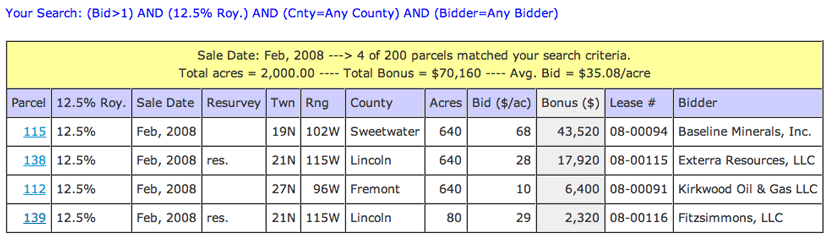
- The text listed in blue, at the top of the page, is your search query
- The yellow table header shows some basic stats regarding the results of search query, such as
number of parcels that matched your search and the total parcels searched
- If your query matched a parcel(s) the Total Acres, Total Bonus, and Avg Bid (Total Bonus
divided by Total Acres) are shown
- The column highlighted grey identifies the variable the table is sorted on (here it was Bonus)
- Click on the parcel number link to view the complete parcel description (opens in new window)
- An asterisk (*) before the County indicates that that parcel covers more than
one county. Click on the parcel number link to view the second county.
- An asterisk (*) before the Bidder indicates that that parcel had more than one Bidder (i.e. lessee).
Click on the parcel number link to view the second bidder.
- '12.5%' in the 12.5% Roy. column indicates the parcel was offered at a 12.5% Royalty Rate
- To indicate a resurveyed township, 'res.' appears in the Resurvey column
- If the winning bidder of a parcel consisted on more than one lessee initially, the
second 'bidder' will be listed in the parcel description (click on parcel number link)
Graph
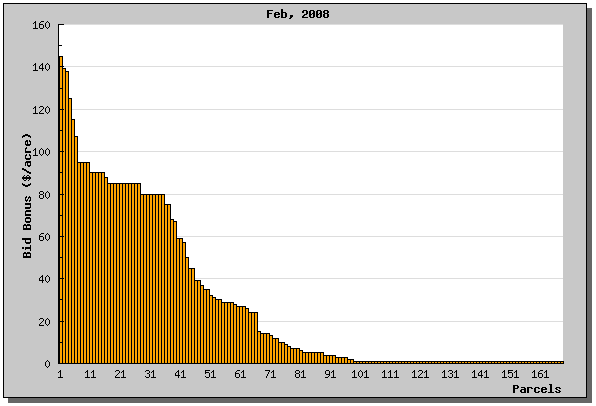
- If your search matched any parcels that received a bid, a graph will be constructed for each table of results
- The y-axis is Bid Amount ($/acre) and is auto scaled
- The x-axis corresponds to parcels (This axis is labeled starting with 1, then 11, 21...)
- Note: The bid amounts are automatically sorted high to low for graphing